
Wild West Pioneers Camera, overlays, and build keys
How the demo camera, HUD, and placement colors actually work — including the scout Explore click.
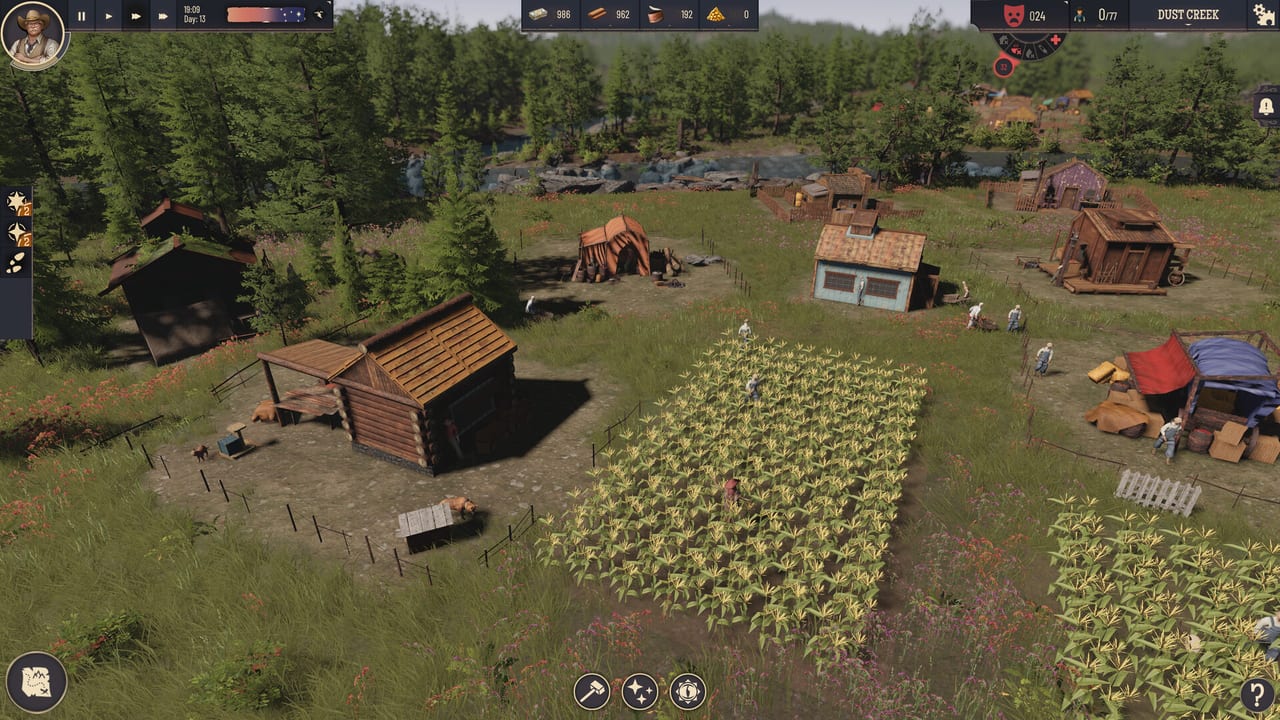
Wild West Pioneers plays like a classic PC city builder: you are not WASD-running a cowboy, you are orbiting a valley and deciding whether a ghost plot is legal. This page is the key and HUD reference for the listed February 2026 Steam demo and for the Early Access build scheduled on 25 September 2026. It is single-player, Windows, from EmpireCraft Studios and Toplitz Productions. Sibling reference pages are system requirements and the building list. The parent index is the tools hub.
A mid-article video shows the demo camera and overlays in motion. Use it once, then keep this text for the click order the video talks over.
Camera: Q, E, and scroll
Q and E rotate the camera around the settlement. That pair is the difference between seeing a warehouse ring and guessing it from a flat screenshot. Scroll zooms. Zoom out to place roads and to read wildlife at the edge of the map; zoom in to confirm a tent is actually on water and not on a pretty rock.
If a building looks legal from one angle and illegal from another, believe the ghost color, not the screenshot. Rotate with Q/E until the footprint is obvious, then confirm. There is no hidden cinematic camera you must unlock; this is the whole view.
HUD bands
Read the screen as three strips.
- Top left: pause and the day display. If the clock is running while you still do not understand a warning, pause. The town will wait. This is a single-player sandbox, not a raid timer.
- Top center: resources. Logs, planks, food, and later bourbon show up here before they show up as a happy street. If this bar is empty, a production building is idle or a warehouse walk is too long — see industry buildings.
- Top right: mood and population. Many screenshots label the town Dust Creek. When this readout sours, check homeless count, water, and meals before you skip the night.
Those three bands are enough to diagnose most stalls without opening a second wiki tab. The settlers guide explains why mood falls; this page only tells you where the number lives.
Left-side overlays
The left stack is not a graphics menu. It is how legal plots appear.
- Default view. Streets, models, and the usual lighting. Fine for dressing roads. Bad for tents and hunters.
- Water view. Shows where water access exists. Use it before placing tents and other water buildings (well, later water tank). A scenic river cliff can still be dry for a tent footprint. If the overlay is dark under the ghost, pick another tile.
- Wildlife view. Settlement looks normal, but animals highlight. That is how you site a hunter’s cabin. Placing a hunter in default view is how you get a cabin with no game.
Switch overlays every time the build hammer is on a thirsty or hunting plot. Do not trust memory from ten minutes ago; wildlife moves and water only cares about the footprint.
Bottom bar: map, hammer, wishes, help
- World map. Opens the wider frontier. Scout expeditions resolve here, not on the town street. After you own a scout cabin, this is where you click destinations.
- Build hammer. The construction list: civic plots, production, housing, and the rest of the confirmed roster on the building list.
- Decoration / wishes. Benches, pets, instruments, fences, and other personal touches. These fulfill settler wishes. They are C-tier on the buildings hub and they do not feed anyone.
- Help. Tooltips and the in-game reminders the tutorial already shouted. Use it when a ring around a warehouse makes no sense, then come back here for the overlay that the help panel assumes you already found.
Placement colors and moving buildings
Ghost plots use three colors:
- Blue: legal. Confirm.
- Yellow: resource conflict. You are overlapping a tree patch, a wildlife footprint, or another claim. Nudge or pick another tile.
- Red: invalid. Water missing, slope, or a rule the overlay would have shown. Do not spam click.
You can move a building from its panel after it is down. That is the intended fix for a logger that landed just outside a warehouse ring, or a tent that looked wet from the wrong camera angle. Moving is cheaper than deleting and rebuilding, and it keeps assigned workers in the same job. The first settlement guide assumes you will use move instead of founding a second ugly warehouse.
Time: pause, speed, skip night
Pause from the top left when you are reading rings. Speed is useful once hunters and loggers are actually working. Skip the night exists, and it is a trap if the food shop is empty. Skipping into a hungry dawn just makes the mood readout fall with no daylight to fix it. If you already sit at max speed, skip night may do nothing visible — that is a demo quirk, not a broken key. Eat, then skip.
Scout click order
Expeditions are a three-step control, not a building bonus that fires itself.
- Select the expedition from the scout cabin / expedition UI.
- Click the destination on the world map.
- Press Explore.
Skip step 3 and you have a highlighted valley and no party on the road. The expeditions page is the strategy; this is the click sequence. Camera rotation still helps on the map so you do not click the wrong ridge.
How controls support the rest of the wiki
Water overlay plus blue ghosts is the whole housing argument. Wildlife overlay plus a warehouse ring is the food argument. Move-building plus rings is the industry argument. If a guide says “place on water” and you are still in default view, the guide is not wrong — the overlay is off.
New players should still run getting started for the first hour and the demo walkthrough for a linear listed-demo path. This controls page is the sheet you keep beside those guides. Specs for the machine live on system requirements. Dates live on Early Access notes. Other tools sit on the tools hub.
Bind the habit, not a custom key file: overlay before tent, overlay before hunter, pause before skip, Explore after the map click. When the 25 September 2026 build adds more overlay filters, they will land on this page as extra rows, not as a rewrite of Q and E. Until a patch notes page exists, treat this list as the demo-true camera, not as a promise that every future panel will stay in the same corner.
Frequently Asked Questions
Quick answers for settlers heading west.
How do I rotate the camera?
Q and E orbit the settlement. Scroll zooms. There is no separate cinematic camera to unlock.
What do the left-side overlays do?
Default is normal view. Water shows legal tiles for tents and wells. Wildlife highlights animals for the hunter's cabin.
What do blue, yellow, and red mean when placing?
Blue is valid, yellow is a resource conflict, red is invalid. Confirm only blue. Move a bad plot from the building panel if you already placed it.
How do I start a scout expedition?
Select the expedition, click a location on the world map, press Explore. Strategy notes are on expeditions.
Should I skip the night?
Only when the food shop and housing are stable. Skipping a hungry night just dumps mood. Pause and fix the stall first.
Where is the rest of the tools section?
The tools hub links system requirements and the building list next to this page.